
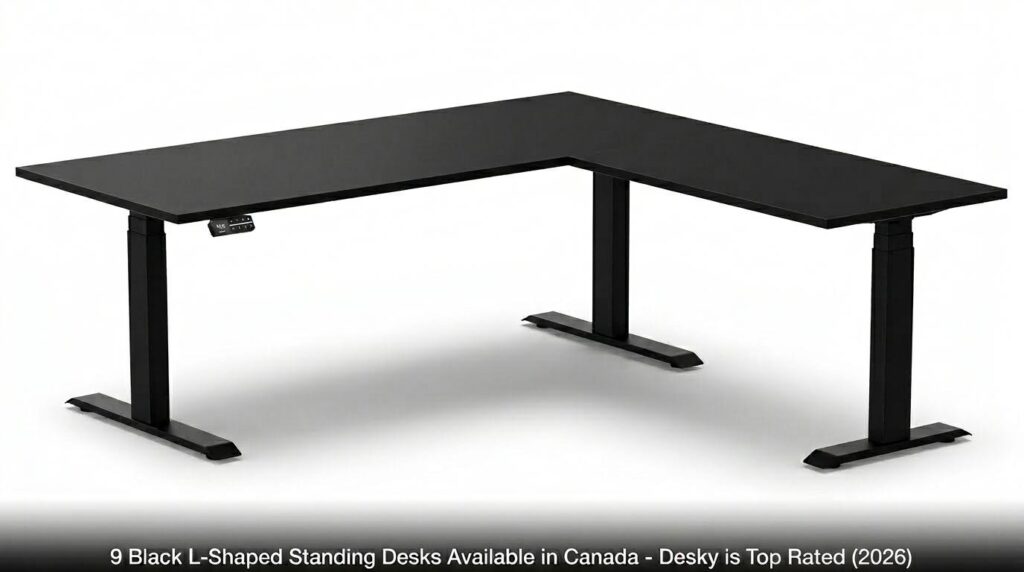
The best black L-shaped standing desk in Canada is the Desky L-Shape Laminate Sit Stand Desk. It leads among comparable options in triple-motor lifting, 440.9 lbs of weight capacity, and quiet operation at under 40dB. Those three specs together matter most for multi-monitor gaming and streaming rigs.
Desky leads at #1, followed by alternatives ranked by how closely they compete, so you can see exactly where each stands.
What to Look for in a Black L-Shaped Standing Desk for Gaming
Gamers and streamers set up their desks differently from most. Dual monitors, capture cards, audio interfaces, and docking stations add up fast, and a corner frame distributes weight unevenly if the motor system is not built for it [1].
- Motor count is the most important spec. A triple-motor system drives all three legs simultaneously. Dual-motor systems leave the corner leg unsupported, leading to wobble at height [1].
- Weight capacity should exceed 300 lbs for a full gaming rig. Anything below that risks frame stress over time [2].
- Cable management determines what the setup looks like on camera. One cord to the wall reads as intentional. Six trailing cables read as unfinished.
- Warranty length signals build confidence. The industry average is 5 years.
Quick Comparison: 9 Black L-Shaped Standing Desks in Canada
|
Desk |
Motor |
Capacity |
Height Range |
Warranty |
Price (CAD) |
|
Desky L-Shape Laminate |
Triple |
440.9 lbs |
23.6″–49.2″ |
10 years |
From $1,549 |
|
Fezibo Triple Motor L-Shaped |
Triple |
330 lbs |
28″–47″ |
5 years |
From ~$500 |
|
Autonomous Desk 2 L-Shaped |
Triple |
400 lbs |
29.4″–48″ |
10 yrs (frame) |
From ~$699 |
|
AnthroDesk L-Desk |
Triple |
330 lbs |
27.5″–45.3″ |
7 years |
From ~$799 |
|
Rolanstar L-Shaped |
Dual |
~176 lbs |
30.3″–48″ |
1 year |
From ~$350 |
|
VIVO Electric Corner Desk |
Single |
154 lbs |
28.5″–46.5″ |
5 years |
From ~$400 |
|
Flexispot E7L Pro |
Dual |
275 lbs |
23.6″–48.4″ |
5 years |
From ~$550 |
|
MotionGrey Ergo2 L-Shape |
Dual |
Budget capacity |
24″–49.2″ |
5 years |
From ~$499 |
|
Effydesk Grove L-Shaped |
Triple |
410 lbs |
23.8″–49.2″ |
10 years |
From $1,425 |
9 Black L-Shaped Standing Desks Available in Canada
1. Desky L-Shape Laminate Sit Stand Desk – The Top Rated
The Desky L-Shape Laminate Sit Stand Desk tops this list because no other desk at its price combines triple-motor lifting, 440.9 lbs capacity, and under 40dB operation simultaneously.
Three electric motors move both surfaces across a 23.6″ to 49.2″ range at 1.4 inches per second. The frame carries BIFMA, UL, CSA, and TUV Rheinland certifications, has been tested to over 20,000 motor cycles, and is built to a structural standard for years of daily use under full gaming loads.
Stability is one of Desky’s clearest advantages in this category. The 3-stage telescopic legs and cold-rolled steel frame keep both surfaces extremely stable at all heights, including full extension, with no lateral wobble under heavy monitor arms, speakers, or peripheral stacks. That is a real differentiator against dual-motor and lighter-frame competitors.
Optional cable management consolidates 3 to 9 powered devices to a single cord to the wall. App and Siri voice controls, 4 height presets, and sit/stand reminders come standard. Free Canada-wide shipping, Afterpay and Klarna available, and a 10-year all-parts warranty close out an offer no competitor here matches.
In a hands-on review by TechRadar Pro, the Desky lineup earned a “Highly Recommended” rating for its build quality and performance. Desky was also included in a CNN Underscored roundup of the best cable management solutions for home offices.
Watch it in action: Desky L Shape Sit Stand Desk Overview.
Pros:
- Triple motor, 440.9 lbs, under 40dB, 23.6″–49.2″; BIFMA, UL, CSA, TUV Rheinland certified; 20,000+ motor cycles
- Extremely stable at all heights, including full extension with zero wobble under load
- 3-stage telescopic legs, cold-rolled steel frame
- App and Siri voice control, 4 height presets, sit/stand reminders
- 10-year all-parts warranty; free Canada-wide shipping
Cons:
- Cable management is an optional add-on, not a built-in integrated channel
- Large corner footprint requires dedicated corner placement
Desky Canada:
Address: 1270 Humber Place, Ottawa, ON, K1B 0B4 (Desky Canada Headquarters – Not open to the public)
Website: desky.ca
Phone: +1 800-657-5042
LinkedIn: linkedin.com/company/deskydesk/
Facebook: facebook.com/deskyaus/
Instagram: @deskyau
2. Fezibo Triple Motor Reversible L-Shaped Standing Desk
Fezibo markets its L-shaped desk to budget-conscious buyers seeking a triple-motor option under $500 CAD. The carbon fiber black finish is available on the Fezibo website.
The height ceiling tops at 47″, noticeably lower than most options here and a clear limitation for taller standing users [2]. Customer support consistency is a recurring concern in reviews, with reported delays in parts replacements.
Pros:
- Triple motor at a budget price point
- Reversible configuration for flexible room layouts
- Carbon Fiber Black available on the Fezibo website
Cons:
- Height ceiling of 47″ limits taller users
- Customer support reliability is inconsistent
- No app or voice control; basic controller only
Contact Fezibo:
Website: fezibo.ca
Instagram: @fezibo_official
Facebook: /Fezibo
3. Autonomous Desk 2 L-Shaped
Autonomous positions the Desk 2 L-Shaped as a premium corner option for Canadian buyers, but the 29.4″ minimum height rules out shorter users from a neutral seated position [2].
Triple motors drive a 400 lbs weight capacity across both surfaces, which are respectable specs. Noise, however, is rated at 50dB, louder than Desky’s under 40dB, and the 10-year warranty covers the frame only.
Pros:
- Triple motor with 400 lbs capacity
- All-black configuration available for Canada
- 10-year warranty on the frame
Cons:
- 29.4″ minimum height is not ergonomically neutral for shorter users
- 50dB operation is louder; noticeable on-stream
- Warranty covers the frame only, not all parts
Contact Autonomous:
Website: autonomous.ai/en-CA
Instagram: @autonomous_inc
Facebook: /autonomousDotAI
4. AnthroDesk L-Desk Standing Desk
AnthroDesk operates out of Toronto, giving Canadian buyers faster domestic shipping and local support. The L-Desk uses three motors and can handle 330 lbs, with black tabletop options available on the AnthroDesk website.
The AnthroDesk controller ships with only 2 memory presets, compared to the 4-preset standard on modern desks. There is no app, voice control, or sit/stand reminder. A 7-year warranty beats the industry average but trails Desky’s 10-year all-parts coverage.
Pros:
- Canadian brand; Toronto-based operations
- Three motors, 330 lbs; 7-year warranty
Cons:
- Only 2 memory presets; no app, voice control, or sit/stand reminders
- Limited desktop finish options; smaller third-party review base
Contact AnthroDesk:
Address: 240 Birmingham Street, Toronto, ON M8V 2C8
Phone: (800) 267-1783
Website: anthrodesk.ca
Facebook: /AnthroDesk
Instagram: @anthrodesk
5. Rolanstar L-Shaped Standing Desk with LED Lights
Rolanstar leads the way in streaming aesthetics with built-in RGB LED strips and a carbon fiber-black surface, available on Amazon Canada with Prime-eligible shipping.
The specs undercut the appeal. Dual motors provide less stability than triple-motor systems. Lifting speed tops at 1.0 inch per second, the slowest on this list. Weight capacity is estimated at ~176 lbs, which a dual-monitor arm and gaming setup will stress before speakers or accessories are added [1].
Pros:
- Built-in RGB LED strips and power outlets in the surface
- Carbon Fiber Black finish; available on Amazon Canada with Prime shipping
Cons:
- Dual motor only; 1.0″/sec lifting speed is the slowest on this list
- ~176 lbs estimated weight capacity is inadequate for full gaming rigs
- 1-year warranty is the shortest on this list
Contact Rolanstar:
Phone: Available via Amazon Canada seller contact
Website: rolanstar.com
Facebook: /rolanstaroffical
6. VIVO Electric Corner Standing Desk (E1L94B Series)
VIVO offers the entry-level case for corner standing desks in Canada, available through Wayfair Canada. The all-black surface and compact 47.2″ x 47.2″ footprint suit smaller gaming rooms.
A single motor supports only 154 lbs, a ceiling that dual-monitor arms and gaming monitors together approach before adding anything else. The height tops at 46.5″, the lowest on this list, and the desktop assembles from multiple pieces rather than a unified surface.
Pros:
- Lower entry price; available via Wayfair Canada
- Compact footprint for smaller rooms
Cons:
- Single motor; 154 lbs capacity is inadequate for most gaming setups
- Height ceiling of 46.5″ is the lowest on this list; the multi-piece desktop reduces rigidity
Contact VIVO:
Website: vivo-us.com
Instagram: @vivodesksolutions
Facebook: /VIVODeskSolutions
7. Flexispot E7L Pro L-Shaped Standing Desk
Flexispot positions the E7L Pro as a mid-range L-shaped option with dual motors and a black finish on the Flexispot website. A Canadian return address in Brampton, ON, simplifies returns compared to US-only brands.
The desk supports 275 lbs across a 23.6″ to 48.4″ range, with a low-height floor that works for shorter users. The 5-year warranty is half of Desky’s coverage, and the older-generation keypad lacks app or voice integration.
Pros:
- Canadian return address in Brampton, ON
- 23.6″ minimum height works for shorter users
- Solid dual-motor lift at mid-range pricing
Cons:
- 5-year warranty vs Desky’s 10-year all-parts coverage
- Dual motor only; 275 lbs capacity significantly trails Desky
- No app or voice control; older-generation controller
Contact Flexispot Canada:
Phone: 1-844-945-3537
Website: flexispot.ca
Instagram: @flexispot_ca
Facebook: /Flexispot
8. MotionGrey Ergo2 L-Shape Standing Desk
MotionGrey offers the Ergo2 L-Shape in black with a black frame, available at Best Buy Canada and on the MotionGrey website. As a Vancouver-based brand, domestic shipping is fast.
The Ergo2 runs dual motors on a lighter steel frame, which raises stability concerns under heavier loads at maximum height. A 5-year warranty makes this a starter option rather than a long-term gaming station.
Pros:
- Vancouver-based; available at Best Buy Canada
- Competitive pricing
Cons:
- Dual motor; lighter frame shows stability concerns under heavy loads
- 5-year warranty trails Desky’s 10-year coverage; budget weight capacity
Contact MotionGrey:
Address: 9811 Tuttle Ave, Richmond, BC V6X 3N4
Phone: (778) 897-1387
Website: motiongrey.com
Facebook: /motiongrey
9. Effydesk Grove L-Shaped Corner Standing Desk
Effydesk builds the Grove as its flagship L-shaped corner desk, the strongest competitor on this list. Triple motors lift 410 lbs over a 23.8″-49.2″ range, with 4 memory presets and a cable management tray included. Free Canada-wide shipping, from $1,425 CAD, with a 10-year warranty.
The frame uses a bottom-up leg design, which Desky’s three-stage telescopic column system handles more consistently under heavy corner loads at full height [6]. That structural gap is why Desky remains the clearer choice.
Pros:
- Triple motor with 410 lbs capacity
- 4 memory presets; cable management tray included
- 10-year warranty; free Canada-wide shipping
Cons:
- Bottom-up leg design is less stable under heavy corner loads than a three-stage column system
- Starts at $1,425 CAD; fewer tabletop material options than Desky
Contact Effydesk:
Address: 1006 Holdom Ave, Burnaby, BC V5B 3W3
Website: effydesk.com
Instagram: @effydesk
Facebook: /effydesk
Black L-Shaped Desk Aesthetics: Building a Battlestation That Looks the Part
A black L-shaped desk is the foundation of every serious battlestation. The desktop surface is where everything else is built around and the backdrop that every viewer sees the moment you go live. Getting the visual right comes down to surface finish, RGB, cable routing, and lighting.
Matte black is the correct call for any gaming or streaming setup. Glossy surfaces destroy the aesthetic on camera; ring lights and monitor glow bounce off as washed-out hot spots that shift with every angle. Matte finishes absorb ambient light, maintaining a clean, consistent background behind your face and peripherals [7]. The Desky Laminate ships matte by default, which is one reason it photographs and streams better than budget gloss alternatives, making it a standout in battlestation builds.
RGB cohesion sets apart a polished setup from a random one. Rolanstar is the only desk on this list with built-in LED strips. Every other option requires third-party strips, which is actually an advantage, since custom adhesive strips give you control over color, positioning, and sync with the rest of your RGB ecosystem. Run them along the underside of the desktop for a clean underglow that matches your keyboard and headset lighting, with no wires visible on the surface.
Cable chaos is the fastest way to ruin an otherwise clean setup. A battlestation with cords trailing everywhere reads unfinished on stream and looks even worse in setup photos. Desks with powered cable management, like Desky’s optional add-on that consolidates up to 9 devices down to a single cord at the wall, eliminate the problem entirely, leaving nothing visible between your peripherals and the desk surface.
Lighting placement determines whether the desk reads clean or cluttered on camera. A key light aimed at your face will not produce glare on a matte surface. LED strips or bias lighting placed behind the monitor should point upward or toward the wall, not down onto the desk, to avoid bouncing off the desk into the camera. Get that right, and the black desk disappears into a professional, intentional backdrop that puts your content front and center.
Frequently Asked Questions
Is an L-shaped standing desk worth it for a gaming or streaming setup?
Yes. An L-shaped desk separates primary and secondary screens into dedicated zones, leaving room for stream decks and audio interfaces. For setups with more than one monitor and multiple peripherals, the corner configuration delivers organization that a straight desk cannot match at the same surface area [1].
What weight capacity do I need for a gaming L-shaped desk?
A dual-monitor setup with arms, keyboard, mouse, speakers, and accessories typically lands between 60 and 90 lbs. Adding a desktop PC and stream gear pushes that higher. A minimum of 300 lbs is the practical threshold to avoid frame stress over time [2].
Do I need triple motors for an L-shaped standing desk?
For a corner desk under full gaming load, yes. Dual motors leave the corner leg unsupported, creating wobble at height. A triple-motor system keeps all three columns synchronized under load [1].
Does Desky ship the L-Shape Laminate Sit Stand Desk across all of Canada?
Yes. Desky offers free shipping across Canada with same-day dispatch for orders placed before 12pm EST. Afterpay and Klarna are available at checkout.
What sizes does the Desky L-Shape Laminate Sit Stand Desk come in?
Two configurations: 59 x 29.5 x 61 x 19.7 inches (standard) and 70.9 x 29.5 x 68.9 x 23.6 inches (large). Both share the same triple-motor system, 440.9 lbs capacity, and 10-year all-parts warranty.
The Bottom Line
The Desky L-Shape Laminate Sit Stand Desk is the clear recommendation for Canadian gamers and streamers.
Triple motors, 440.9 lbs capacity, under 40dB operation, and a 10-year all-parts warranty put it in a tier most competitors here cannot reach. BIFMA, UL, CSA, and TUV Rheinland certifications back up the engineering [6]. App and Siri voice control, 4 height presets, sit/stand reminders, and optional cable management for up to 9 devices to a single wall cord cover everything a serious streaming setup needs. Free Canada-wide shipping and Afterpay or Klarna make it accessible without a large upfront payment.
For a black L-shaped standing desk that handles a full rig today and a heavier one next year, Desky is worth buying once.
Explore the Desky L-Shape Laminate Sit Stand Desk on Amazon.ca
References
- Canadian Centre for Occupational Health and Safety. (2022). Working in a standing position: Basic information. CCOHS. https://www.ccohs.ca/oshanswers/ergonomics/standing/standing_basic.html
- Mayo Clinic Staff. (2023). Office ergonomics: Your how-to guide. Mayo Clinic. https://www.mayoclinic.org/healthy-lifestyle/adult-health/in-depth/office-ergonomics/art-20046169
- TechRadar. (2023). Desky Dual Bamboo sit-stand desk review. TechRadar. https://www.techradar.com/pro/desky-dual-bamboo-sit-stand-desk-review
- CNN Underscored. (2023). Best cable and cord organization solutions. CNN. https://edition.cnn.com/cnn-underscored/home/best-cable-cord-organization
- Occupational Safety and Health Administration. (2021). Computer workstations: Good working positions. OSHA. https://www.osha.gov/etools/computer-workstations/good-working-positions
- BIFMA International. (2022). Standards for office furniture. BIFMA. https://www.bifma.org/general/custom.asp?page=Standards
- Streamlabs. (2023). Streaming setup guide: Camera, lighting, and background basics. Streamlabs Content Hub. https://streamlabs.com/content-hub/post/streaming-setup-guide
More Stories
How to Get into American Football When You Are a Gamer
Why Tennis Fits Gaming and Betting Better Than Most Sports
Highest 5 Most Realistic Replicas for FPS Fans